Pass Audits Faster: 2–4 Week Document Request Pilot for Mortgage Teams

Document requests automation replaces manual back-and-forth emails with structured portals, reminders, and tracking that collect the right paperwork faster and with a verifiable trail. Teams that handle intake at scale, or that answer to a regulator or auditor, see the clearest gains: fewer follow-ups, faster turnaround, and a record of who submitted what and when. If your process still runs on email attachments and spreadsheets, this is the fix.
TL;DR:
- Automated request workflows are essential for high-volume, compliance-sensitive document collection, reducing follow-ups, speeding up processing, and ensuring verifiable audit trails.
- Building effective workflows involves setting up branded portals, validation rules, automated reminders, escalation logic, and secure storage, with early testing of templates and exception handling.
- Critical features include role-based access, integration capabilities, audit logging, encryption, and user-friendly portals; verify audit exports and security measures during vendor demos.
- Prioritize automating high-frequency, risk-sensitive documents like KYC forms, loan disclosures, and onboarding checklists, especially when volume, complexity, and compliance risk are high.
- Successful rollout depends on defining scope, involving requesters in design, training users, managing change deliberately, and establishing clear manual override procedures for exceptions.
Table of Contents
- What document requests automation actually covers
- Building the canonical request workflow
- Features and controls to require before you buy
- Which documents to automate first
- A rollout checklist that goes from pilot to scale
- Security and compliance evidence to demand from vendors
- Turning automation into numbers stakeholders understand
- Where document request automation projects go wrong
- Comparing approaches to document request platforms
- Getting your team to actually use the new system
- When to step in manually
- Notes from automating document intake in mortgage workflows
- Where LoanOfficer.ai fits this checklist
- Where to verify these controls yourself
- Sources
- FAQ
What document requests automation actually covers
Document requests automation refers to the systems and workflows that manage the collection side of paperwork: asking for documents, validating what comes back, chasing missing items, and logging the entire exchange. It is easy to confuse with document generation or assembly software, which builds contracts, forms, or agreements from templates. The two are related but solve different problems.
Generation tools answer “how do we create this document?” Request automation answers “how do we get this document from someone else, verify it’s complete, and prove we asked for it?” A mortgage team generating a loan disclosure uses assembly software. That same team asking a borrower for pay stubs, bank statements, and a signed authorization is running a request automation workflow.
Teams and processes that typically rely on this kind of automation include:
- Loan origination and underwriting teams collecting borrower financial documents
- HR departments gathering onboarding paperwork, tax forms, and compliance acknowledgments
- Legal and compliance teams running know-your-customer (KYC) or vendor due diligence checks
- Accounting and audit teams requesting supporting records during a review
Anywhere a business needs a document from someone outside its own systems, request automation is the layer that manages the ask, the follow-up, and the proof.
Building the canonical request workflow
A well-built document request workflow follows a predictable sequence, and comparing that sequence against your current process (or a vendor’s demo) is the fastest way to spot gaps.
- Intake setup: Create a branded portal or link where the requester defines exactly which documents are needed, using reusable templates rather than typing a new list every time.
- Validation rules: Configure completeness checks (file type, required fields, page counts, expiration dates) so a submission is flagged automatically if it’s missing something.
- Reminder and escalation logic: Set automated reminders on a fixed cadence, with escalation to a manager or a different contact if the deadline passes without a response.
- Review and approval routing: Route completed submissions to the right reviewer, with conditional paths for exceptions, such as sending self-employed borrower documents to a specialist.
- Storage, versioning, and audit logging: Store the final documents with version history and a time-stamped record of every request, reminder, submission, and approval action.
Platforms built for this purpose typically bundle reusable templates, completeness checks, reminder schedules, and audit-ready histories into one system rather than requiring separate tools for each step, according to document automation tool guidance. That consolidation is often the difference between a workflow that scales and one that collapses under its own manual steps once volume increases.
Pro Tip:Build your validation rules before you build your reminder cadence. A system that reminds people to submit incomplete documents just creates more work downstream.
Features and controls to require before you buy
Once you know the workflow you want, translate it into a specification. Procurement conversations go faster when you ask for features by name instead of describing outcomes.
- Secure, branded portals with passwordless or link-based access so requesters don’t need to remember another password
- Reusable templates with prefilled fields and conditional sections that adjust based on document type or requester profile
- Automated reminders and SLA escalations that trigger without manual tracking, plus reporting on turnaround times
- Integrations and APIs, including single sign-on (SSO), CRM or loan origination system (LOS) connections, e-signature tools, and webhooks for custom workflows
- Audit trails, encryption, and role-based access control (RBAC) with exportable evidence you can hand to an auditor without extra formatting work
On the security side, ask vendors directly about encryption at rest and in transit, and whether their audit logs are time-stamped and exportable in a format your compliance team can use. Time-stamped, exportable logs matter because they’re often the first thing an auditor or regulator asks to see, and reconstructing them after the fact from email threads is far slower than pulling them from a system that logged everything as it happened.
Pro Tip:Ask for a sample audit log export during the demo, not after you sign. If the vendor can’t produce one on the spot, that’s a signal about how mature the feature really is.
Which documents to automate first
Not every document type deserves the same priority. A simple heuristic helps: multiply frequency, complexity, and compliance risk to find where automation pays off fastest.
- High-volume, repeatable documents: NDAs, standard intake forms, and onboarding checklists that follow the same template every time
- Regulatory or risk-sensitive documents: KYC verification, loan disclosures, and identity documents where a missing signature or expired ID creates real exposure
- Cross-team examples: HR onboarding packets and vendor onboarding due diligence, both of which repeat constantly and touch multiple approvers
- Low-frequency, highly custom documents: usually the last candidates for automation, since the setup cost outweighs the time saved
Start with whatever combination scores highest on all three factors. A document requested weekly, with strict compliance requirements and a fixed format, is the clearest early win.
A rollout checklist that goes from pilot to scale
Implementation succeeds or fails on sequencing. Skipping steps to move faster usually means redoing them later.
- Define scope and success metrics before touching any software: pick one document type, one team, and a measurable target like reduced follow-up time.
- Inventory documents and assign owners so every request has a named person responsible for its template, its validation rules, and its escalation path.
- Configure templates, validations, and integrations in a sandbox or limited environment, not live with real requesters on day one.
- Pilot, measure, and iterate with a small group for two to four weeks, then expand once the completeness rate and turnaround time hold steady.
- Establish governance: retention schedules, periodic access reviews, and a documented incident response plan in case a request or submission goes wrong.
Treat the pilot as a real test, not a demo. Run it with actual requesters and actual deadlines, and track how many submissions came back complete on the first try versus how many needed a second round.
Pro Tip:Assign one owner per document type from day one. Shared ownership is where automated workflows quietly fall apart, because no one notices a broken template until someone escalates.
Security and compliance evidence to demand from vendors
Automation only helps if it holds up under audit or regulatory review, so the controls behind the workflow matter as much as the workflow itself.
For financial institutions and regulated lenders, the FTC Safeguards Rule requires reporting unauthorized acquisition of unencrypted customer information affecting a threshold number of consumers, along with a documented information security program covering administrative, technical, and physical safeguards. That reporting threshold is exactly why time-stamped, exportable audit logs matter: they’re the evidence you’d need to show what happened, when, and to whom.
On the vendor side, look for:
- A SOC 2 report with a defined scope and period, since SOC 2 is an audit report rather than a blanket certification, and Type II specifically demonstrates operational effectiveness over time rather than just design at one point
- Encryption at rest and in transit, confirmed in writing, not just implied
- Single sign-on and phishing-resistant multi-factor authentication, which CISA recommends as a secure-by-design practice that reduces credential theft and lateral movement
- A compliance or trust portal where you can request SOC reports and other documentation directly
A time-stamped audit trail is often the single piece of evidence regulators and auditors ask for first, according to FTC Safeguards Rule guidance, making it one of the most practical controls to verify before signing a contract.
Turning automation into numbers stakeholders understand
Automation is easier to defend internally when it’s tied to numbers rather than described as a general improvement.
- Turnaround time: average days from first request to a complete submission, tracked before and after automation
- Follow-up reduction: number of manual reminder emails or calls sent per request, which should drop sharply once automated reminders take over
- Completion rate: percentage of requests that come back complete on the first submission versus requiring a second round
- Time saved converted to FTE equivalents: total hours saved per month divided by standard working hours, framed as a fraction of a full-time role freed up for other work
Beyond the numbers, qualitative wins matter to stakeholders too: fewer escalations, calmer month-end closes, and a documented process that survives staff turnover instead of living in one person’s inbox. Report these metrics on a regular cadence, monthly or quarterly, and pair a simple trend line with one or two numbers stakeholders can repeat in a meeting.
Where document request automation projects go wrong
The most common failure isn’t the software, it’s the rollout. A few patterns show up repeatedly.
Over-customizing templates before testing them. Teams build elaborate conditional logic for every edge case before running a single real request, which delays launch and adds complexity nobody asked for yet. Start with a simple template and add conditions only once real submissions show you need them.
Treating the portal as optional. If requesters can still email documents outside the system “just this once,” you lose the audit trail and the completeness checks that justified the switch. Make the portal the only accepted channel from day one, even if it means a slower start.
Ignoring the requester experience. A confusing multi-step wizard causes people to abandon the request entirely or submit incomplete files out of frustration. A simple checklist interface, with clear labels for each required item, tends to produce higher completion rates than a form that feels like a test.
Skipping the pilot phase. Rolling out to an entire department at once means any template or validation mistake affects everyone simultaneously, instead of a small group you can fix quietly. A two to four week pilot with a handful of requesters catches most problems before they become widespread.
Underestimating exception volume. Every workflow has submissions that don’t fit the standard path, and teams that don’t plan for that ahead of time end up handling exceptions manually anyway, without any of the tracking the automated path provides.

Comparing approaches to document request platforms
Document request platforms generally fall into a few categories, each with real trade-offs.

General-purpose e-signature and document platforms often bolt request features onto tools built primarily for signing. They tend to have strong signature workflows but shallower validation and reminder logic, since collection wasn’t the original design focus.
Dedicated document request and intake tools are built specifically around the ask-validate-collect cycle, usually with stronger completeness checks, branded portals, and audit logging out of the box. The trade-off is that they may need a separate integration to your CRM or line-of-business system rather than coming bundled with one.
Industry-specific CRMs with built-in request features integrate document collection directly into the broader workflow, so a request ties automatically to a client record, a pipeline stage, or a loan file rather than living in a separate tool. This tends to reduce the number of systems a team has to check, at the cost of being narrower in scope outside that industry.
Enterprise platforms with custom-built request modules offer the deepest configurability and the most integrations, but usually require longer implementation timelines and dedicated technical resources to set up properly.
The right choice depends less on feature checklists and more on how closely the platform’s default workflow matches the one you already mapped out earlier in this guide. A tool that requires you to rebuild your process around its limitations isn’t saving you the time it promises.
Getting your team to actually use the new system
The best-configured workflow fails if the people using it revert to old habits. Change management deserves as much planning as the technical setup.
Involve requesters and reviewers in template design, not just administrators. The people fielding questions from confused clients or vendors know exactly where a template’s wording causes friction, and their input catches problems before launch.
Run a short, hands-on training session instead of a written guide alone. Watching someone submit a real (or test) request end to end surfaces confusion faster than a document ever will.
Communicate the “why” alongside the “how.” Teams adopt new tools faster when they understand the reminder emails will stop the manual chasing, not just that a new button exists somewhere.
Designate a point person during the first few weeks who can answer questions in real time, separate from whoever is managing the rollout at a project level. This prevents small confusions from turning into abandoned requests.
Retire the old channel deliberately. Announce a specific date after which email submissions are no longer accepted, rather than letting the two channels run in parallel indefinitely, which tends to just delay adoption.
When to step in manually
No workflow, however well designed, handles every case automatically. Building a clear exception path matters as much as building the automated one.
Common triggers for manual intervention include a requester who can’t access the portal, a document that fails validation for a legitimate reason (a scanned form with a slightly different layout, for instance), or a submission that needs judgment a rule can’t capture, like verifying an unusual income source.
The fix is not to avoid exceptions, it’s to route them clearly. Set up a defined escalation path so flagged submissions land with a specific reviewer rather than sitting in a queue nobody owns. Log manual overrides the same way automated actions are logged, so the audit trail stays complete even when a human stepped in. And review exception patterns periodically: if the same type of document keeps failing validation, that’s a signal to fix the template or the rule, not the individual submission.
Notes from automating document intake in mortgage workflows
Mortgage document collection is a useful stress test for this whole approach: high volume, strict compliance requirements, and borrowers who are often submitting sensitive financial paperwork for the first time. The pattern holds across industries. A branded portal with clear validation and automated reminders consistently outperforms email threads, both in completion speed and in the quality of the audit trail left behind. The gap between “we asked for it” and “we can prove we asked for it, and when” is where most compliance headaches start.
— Jared Hart
Where LoanOfficer.ai fits this checklist
If you work in mortgage lending specifically, the checklist above maps closely to what Loanofficer builds into its AI Mortgage CRM. Rather than adding a separate request tool on top of your existing systems, document collection lives inside the same platform that handles borrower follow-up, pipeline tracking, and refinance opportunity alerts.
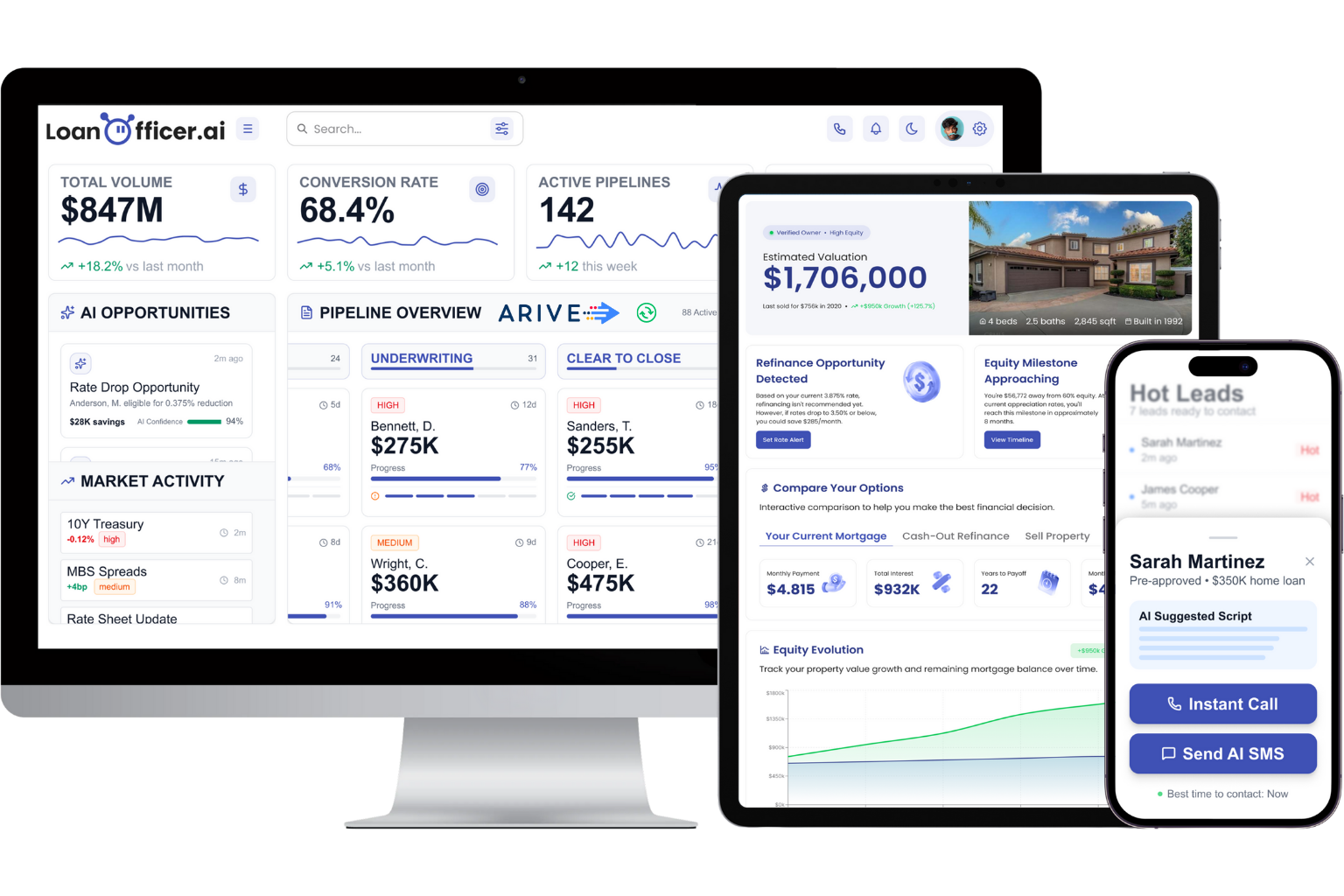
What this looks like in practice:
- A borrower portal built around a digital 1003 application, with completeness checks baked into the submission flow
- Automated reminders tied to the same system tracking your pipeline, so a missing document doesn’t require a separate follow-up tool
- Integrations with loan origination systems so collected documents connect directly to the loan file instead of sitting in a separate inbox
- Audit trails covering borrower interactions across the platform, not just the document request itself
When you take a demo, ask specifically how the borrower portal handles validation failures and what the audit export looks like. Those two answers tell you more than a feature list ever will.
Plans start at $197 a month for Starter, with Team and Brokerage tiers available as your document volume grows, plus a one-time $299 onboarding fee. You can also start a trial to see the borrower portal and reminder workflow firsthand before committing.
Where to verify these controls yourself
For deeper reading, the FTC Safeguards Rule overview covers reporting thresholds and required safeguards, while CISA’s phishing guidance details secure-by-design practices like MFA and SSO. For a broader look at building automation checklists for smaller teams, the marketing automation checklist guide offers useful analogies for sequencing a rollout.
Sources
- FTC — Safeguards Rule: What Your Business Needs to Know
- Attorney at Work — Document automation tools
- CISA — Phishing guidance: stopping the attack cycle at phase one
FAQ
What is document automation?
Document automation refers broadly to software that handles document creation, collection, or processing without manual steps at each stage. It covers both generation (building contracts or forms from templates) and request automation (collecting documents from others with validation and tracking).
How do you automate the documentation process?
Start by mapping your current request workflow, then configure reusable templates, validation rules, and automated reminders inside a dedicated platform. Pilot the setup with a small group before rolling it out broadly, and build in audit logging from the start rather than adding it later.
What are the four types of automation?
Definitions vary across sources, but a common framework distinguishes basic automation (simple rule-based tasks), process automation (multi-step workflows), integration automation (connecting systems to share data), and intelligent automation (using AI or machine learning to handle judgment-based tasks).
What are some effective document automation tools?
Effective tools generally share a few traits: reusable templates, completeness validation, automated reminders, and exportable audit logs, as outlined in document automation tool guidance. The right choice depends on whether you need a standalone request tool or one built into an industry-specific system like a CRM.
How do you handle exceptions in an automated document request workflow?
Set up a defined escalation path so failed or unusual submissions route to a specific reviewer instead of sitting unresolved. Log manual overrides the same way automated actions are logged, so the audit trail stays complete even when a person steps in.
