2–8 Week Pilot: 5 Mortgage Pipeline Automations for Loan Officers
Connecting your LOS to your CRM through event triggers, then automating five core workflows, recovers hours of selling time per week and lowers cost per funded loan. The single best first move is wiring status-change webhooks from your loan origination system directly into CRM updates. Everything else in this guide builds from that one integration outward.
TL;DR:
- Connecting LOS status changes directly to the CRM through webhooks can eliminate thousands of manual updates annually, significantly boosting productivity.
- Automating workflows such as stage changes, document receipt tracking, rate-lock alerts, borrower communications, and referral attribution covers most time-wasting friction points.
- Ensuring integration reliability requires precise event-to-field mapping, implementing idempotency, and assigning ownership of exception handling to prevent silent failures.
- Running small pilot programs over two to eight weeks and measuring key KPIs like pull-through rate and time-in-stage provides clear ROI evidence before full rollout.
- Prioritizing deep, high-impact integration on a few workflows outperforms superficial tool stacks, with purpose-built mortgage CRMs offering native automation that avoids the interoperability tax.
Table of Contents
- What Mortgage Pipeline Automation Actually Means
- Core Components and Event-Driven Automation Patterns
- The Five Workflows to Automate First
- Building an Integration That Doesn’t Break
- How to Measure Whether It’s Actually Working
- Rolling It Out Without the Common Mistakes
- How LoanOfficer.ai Applies These Patterns
- The Real Priority Order
- See These Automations Live in a Mortgage CRM
- Sources
- FAQ
What Mortgage Pipeline Automation Actually Means
Mortgage pipeline automation is the practice of connecting your loan origination system, CRM, document platform, and communication channels so that events in one system trigger actions in another, without a human retyping the same data three times. A status change in Encompass writes itself into your CRM. A completed disclosure logs itself as a task. A rate lock nearing expiration fires an alert before anyone has to notice it manually.
The benefits show up in three places: less rework, more selling hours, and better pull-through. Mortgage operations teams routinely pull data from four or more disconnected systems, and processors can lose 2 to 3 hours a day toggling between tools, which adds up to many hours a month per processor. That is not a minor tax on productivity. It is the difference between a loan officer who spends afternoons prospecting and one who spends them copying loan numbers into spreadsheets.
Automation only pays off when it targets root causes, not just symptoms:
- Reduced manual rekeying between LOS and CRM
- Fewer incomplete files reaching underwriting
- Improved pull-through because nothing sits forgotten in a queue
- More accurate rate-lock and hedge decisions because data updates in real time
Core Components and Event-Driven Automation Patterns
The building blocks of a working automation stack are simpler than most vendors make them sound: an LOS, a CRM, a document or e-sign platform, notification channels (SMS and email), and an orchestration layer or integration platform (iPaaS) that ties them together.
The pattern that makes this work is event-driven, not batch-driven. A loan’s status changes in the LOS. That change fires a webhook. An orchestration layer checks the event against mapping rules and idempotency logic, then writes the update into the CRM and, if needed, spins up a follow-up task for the loan officer. If the write fails, it logs an exception instead of failing silently, and someone gets a task to fix it by hand.
One documented example: mapping an Encompass loan.statusChanged webhook to a CRM write eliminated thousands of manual CRM entries a year for a 300-loan shop. That is nearly 2,700 moments where a loan officer or assistant didn’t have to stop selling to update a record.
Three practices separate reliable automation from fragile automation:
- Idempotency: the same event fired twice should never create duplicate tasks or double-log a status
- Field mapping: decide in advance exactly which LOS fields map to which CRM fields, and document it
- One-directional writes: let the LOS remain the source of truth for loan data, with the CRM receiving updates rather than pushing conflicting changes back
Pro Tip:Start with one-way writes from LOS to CRM before you even consider bidirectional sync. Two systems arguing over which one is right is a worse problem than a manual update.
The Five Workflows to Automate First
Most CRM update friction concentrates in five categories, and automating them captures the bulk of the available time savings. Automating these five workflows can recover several staff hours a week for a mid-size broker.
- Stage-change triggers: every LOS status update should push into the pipeline view and auto-generate a loan officer task, so no one is manually clicking through files to check where things stand.
- Document receipt and completion tracking: log incoming documents automatically and calculate a live document-completion percentage instead of eyeballing a checklist.
- Rate-lock expiry alerts: fire escalating notifications as a lock nears its deadline, with a second alert to a manager if the loan officer hasn’t acted.
- Borrower communication logging: SMS and email templates that fire on milestone events, auto-logged to the CRM so nothing lives only in a personal inbox.
- Referral source attribution: tag every loan back to its referral partner automatically and generate partner-facing reports without manual data pulls.
These five alone address most of the friction that eats a loan officer’s week.
Building an Integration That Doesn’t Break
Reliable automation depends on sequence, not just tools. Skip a step here and you end up rebuilding the whole thing six months in.
Before you connect anything, map every LOS event you care about to a specific CRM field, and decide explicitly which events are allowed to auto-write versus which need a human to confirm first. Prioritize three fields to automate initially: loan stage, rate-lock expiration, and document-completion percentage. Route anything ambiguous into a human review queue rather than letting the system guess.

During the build, add monitoring and retry logic from day one, not as an afterthought. Failed API writes need alerts and a dashboard, because automation that fails silently is worse than no automation at all since it creates false confidence in data nobody actually checked.
Once live, update your standard operating procedures to reflect who owns the exception queue, test the integration against edge cases (canceled loans, re-disclosures, file transfers between officers), and build a lightweight dashboard that shows failed writes in one place.
- Map events to fields before writing a single integration
- Build idempotency and retry logic into every automated write
- Assign explicit ownership of the exception queue, not “whoever notices”
Pro Tip:Give the exception queue a name and an owner on day one. An unowned queue becomes a graveyard of unresolved data errors within a month.
How to Measure Whether It’s Actually Working
Four numbers tell you whether automation is paying off: pull-through rate, average time-in-stage, loan officer selling hours recovered, and cost per funded loan. Track all four before you automate anything, because a baseline is the only way to prove the pilot mattered.
A short pilot is the fastest way to get a real answer. Pick one branch or a cohort of 5 to 10 loan officers, automate two or three high-frequency workflows, and run it for two to eight weeks against a matched control group that keeps working the old way.
Mortgage industry data shows cost per funded loan has climbed across the industry, which is exactly why root-cause automation, not point fixes, is the target worth chasing.
When you present results to stakeholders, translate hours into dollars: recovered selling hours times average hourly cost, plus the reduction in exception rate, gives you a number a branch manager can act on immediately.
- Baseline every KPI before the pilot starts
- Choose a cohort small enough to manage, large enough to be credible
- Set a success threshold in writing before you launch, not after
Rolling It Out Without the Common Mistakes
The sequence matters more than the tool list. Map your highest-friction events first, wire up two or three quick triggers, test them against real edge cases for a couple of weeks, then expand once they’re stable.
- Map the five priority workflows against your current LOS and CRM fields.
- Build and launch the two highest-friction triggers, such as stage changes and rate-lock alerts.
- Test against edge cases: canceled files, officer reassignment, duplicate events.
- Expand to document tracking, borrower communications, and referral attribution once the first two are stable.
- Update SOPs and assign exception-queue ownership before scaling further.
The most common failure isn’t a bad tool. It’s too many tools stacked without integration depth, which analysts describe as an interoperability tax that quietly raises cost per loan even as teams believe they’re automating. A close second is turning on bidirectional sync without clear rules for which system wins a conflict, and skipping monitoring entirely because “it worked in testing.”
Pro Tip:Resist the urge to automate everything in month one. Two workflows done well beat six done sloppily, every time.
How LoanOfficer.ai Applies These Patterns
A purpose-built mortgage CRM handles this integration work instead of leaving it to a patchwork of point tools. Loanofficer centralizes LOS events, borrower communications, and referral data in one place, then automates the follow-ups and opportunity detection that would otherwise require a loan officer to remember to check.
Because intelligence flows downstream through the entire lifecycle rather than stopping at a single task, connected AI systems deliver more value than isolated point automations. LoanOfficer.ai’s pipeline management tools apply that same principle, surfacing refinance and HELOC opportunities in real time as equity and rate conditions shift.
If you’re evaluating a platform, ask to see three specific things in a demo:
- Live status writes from an LOS event into the CRM pipeline
- Rate-lock expiry alerts with an escalation path
- Document-receipt tracking tied to a completion percentage
The Real Priority Order
Chase integration depth before you chase feature count. A CRM that writes clean status updates and rate-lock alerts beats five disconnected tools bolted together with good intentions. Pick two or three high-impact triggers, measure them against a real baseline, and only then decide what to automate next. Everything else is noise until those two things are working.
— Jared Hart
See These Automations Live in a Mortgage CRM
Every workflow covered here, stage-change triggers, rate-lock alerts, document tracking, borrower logging, referral attribution, is exactly what a well-built mortgage CRM can run natively, avoiding a patchwork of disconnected point tools.
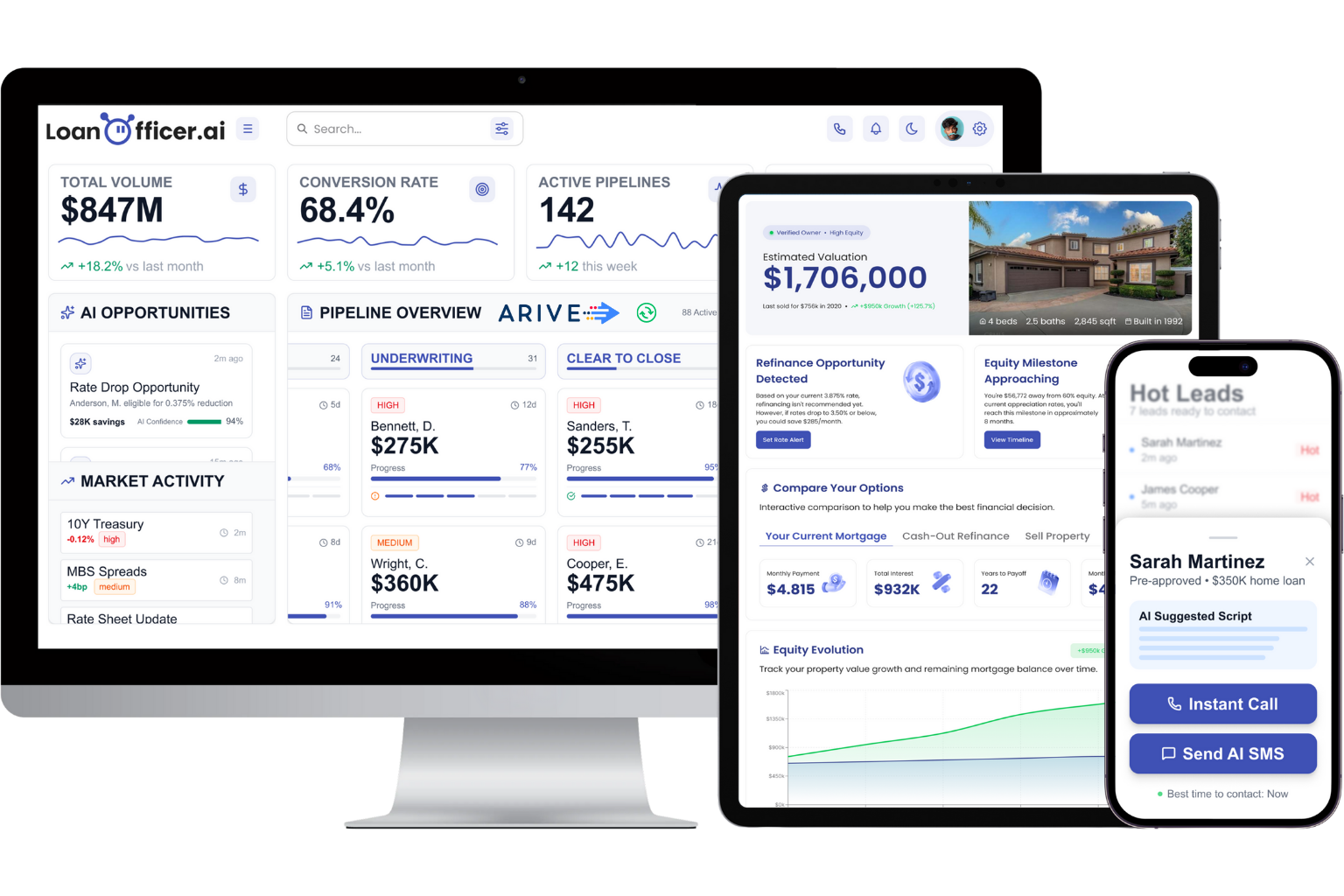
Instead of stitching together a webhook here and a Zapier flow there, you get one platform where LOS events, CRM updates, and borrower touchpoints already talk to each other. That’s the integration depth the interoperability tax problem is really about: fewer seams, fewer silent failures, less time spent babysitting connections between tools.
If you want to see it work on your own pipeline, request a demo of the mortgage CRM built for loan officers and ask specifically to see status writes, rate-lock expiry alerts, and document-receipt automation in action. You can also start a free trial and pilot two workflows this quarter before committing to anything larger.
Sources
Findings here draw on the CFPB’s borrower servicing report, HousingWire on integration costs, Mortgage Workspace on data fragmentation, and US Tech Automations on workflow prioritization.
- Part 1: The Problem – “You’re Flying Blind Without the Right Data”
- Consolidate CRM Updates for Mortgage Brokers 2026
FAQ
What Is Mortgage Automation?
Mortgage automation connects your loan origination system, CRM, document platform, and communication tools so that events in one system trigger updates in another automatically, cutting manual data entry and reducing missed follow-ups.
What Is a Mortgage Pipeline?
A mortgage pipeline is the full set of loans currently in process, tracked by stage from application through closing, and pipeline automation keeps that stage data accurate without manual updates at every step.
What Is the 3-7-3 Rule for a Mortgage?
The 3-7-3 rule refers to Truth in Lending Act disclosure timing: lenders must send initial disclosures within 3 business days of application, wait a required number of days before closing, and re-disclose with another 3-day wait if terms change materially. It’s a compliance timeline, not an automation framework, though automated alerts can help track these deadlines.
How Much Commission Do Loan Officers Make on a $500,000 Loan?
Commission structures vary widely by lender, loan type, and compensation plan, so there’s no single fixed percentage that applies industry-wide. Loan officers should check their specific compensation agreement rather than rely on a general rule of thumb.
Can an AI CRM Handle Rate-Lock and Document Alerts?
Yes. Platforms like Loanofficer are built to fire rate-lock expiry alerts and track document-completion percentages automatically, which are two of the five highest-impact workflows to automate first.
