LOS–CRM Integration for Loan Officers: Close Faster
The fastest, lowest-risk path for mortgage teams is a targeted, bi-directional integration that uses event-driven webhooks (LOS to CRM) plus API-prefill (CRM to LOS), with a configurable middleware or native connector as fallback. Prefill is the easy half — getting borrower data from your CRM into the LOS at application creation works reliably with most vendors. The real failure point is status write-back: without real-time LOS-to-CRM updates, your pipeline view goes stale within hours and your team makes decisions on outdated data.
Three things to do this week:
- Audit your critical fields. Pull a list of every field your LOs reference daily: loan status, rate lock expiry, estimated close date, and borrower contact info. These are your minimum viable sync set.
- Prioritize status write-back. Ask your CRM vendor to demonstrate a live status change in the LOS appearing in the CRM in under 90 seconds. If they can’t show it, the integration is one-directional and will create problems.
- Schedule a vendor demo with a specific test. Add a custom field in the LOS during the demo and count how many steps it takes to remap it in the CRM. That number tells you your long-term maintenance cost.
Table of Contents
- Why does LOS–CRM integration matter for mortgage teams?
- What integration architecture should you choose?
- How do you implement LOS–CRM integration in three steps?
- What roadblocks will you hit, and how do you clear them?
- Which CRM features do mortgage loan officers actually need?
- What does a realistic implementation checklist look like?
- How does Loan Officer AI integrate with LOS, and what results can you expect?
- How do you protect mortgage data during integration?
- How do you keep data consistent after the integration goes live?
- How do you monitor and maintain the LOS–CRM connection over time?
- What the right LOS–CRM integration approach looks like for loan officers
- What most integration guides get wrong about LOS–CRM connections
- Loan Officer AI gives you the integration your pipeline actually needs
- Sources
Why does LOS–CRM integration matter for mortgage teams?
Loan officers running separate LOS and CRM systems without a live connection spend real time every day doing work the software should handle. Duplicate data entry across Encompass, Calyx, or BytePro and a CRM like Salesforce or a mortgage-specific platform creates a compounding error risk: one field updated in the LOS and missed in the CRM means a follow-up email goes out with the wrong rate lock date, or a pipeline report shows a loan as “in processing” when it funded two days ago.
The operational gains from connecting these systems go beyond convenience. Published case data points to an increase in client satisfaction after LOS–CRM integration, driven largely by faster, more accurate borrower communication. When the CRM knows a loan just hit “conditional approval,” it can trigger a borrower update automatically, without an LO manually checking the LOS and drafting a message.
The commercial impact is just as concrete. Stale CRM data causes sales and ops teams to misalign on which loans need attention. A file that’s been sitting at “submitted to underwriting” for three days in the LOS but still shows “in processing” in the CRM gets missed in pipeline reviews. That’s a stalled deal that could have been rescued with a single timely call. Tying LOS status changes to CRM communication sequences — rate-lock reminders, doc chase sequences, funding congratulations — turns a passive pipeline into an active one.
The write-back gap is where most teams lose time. A CRM that only receives data at application creation and never again is not integrated. It’s a one-time import with a fancy name.
What integration architecture should you choose?
Four approaches cover the full range of team sizes and LOS capabilities. Each has a distinct risk and maintenance profile.
Native connectors
Pre-built connections between specific LOS and CRM vendors. Setup is fast and requires no engineering. The tradeoff: you’re locked to the vendor’s update schedule, and if your LOS adds a custom field, you wait for the vendor to support it. Best for teams on popular LOS/CRM pairs where the connector is actively maintained.
Direct API plus webhooks
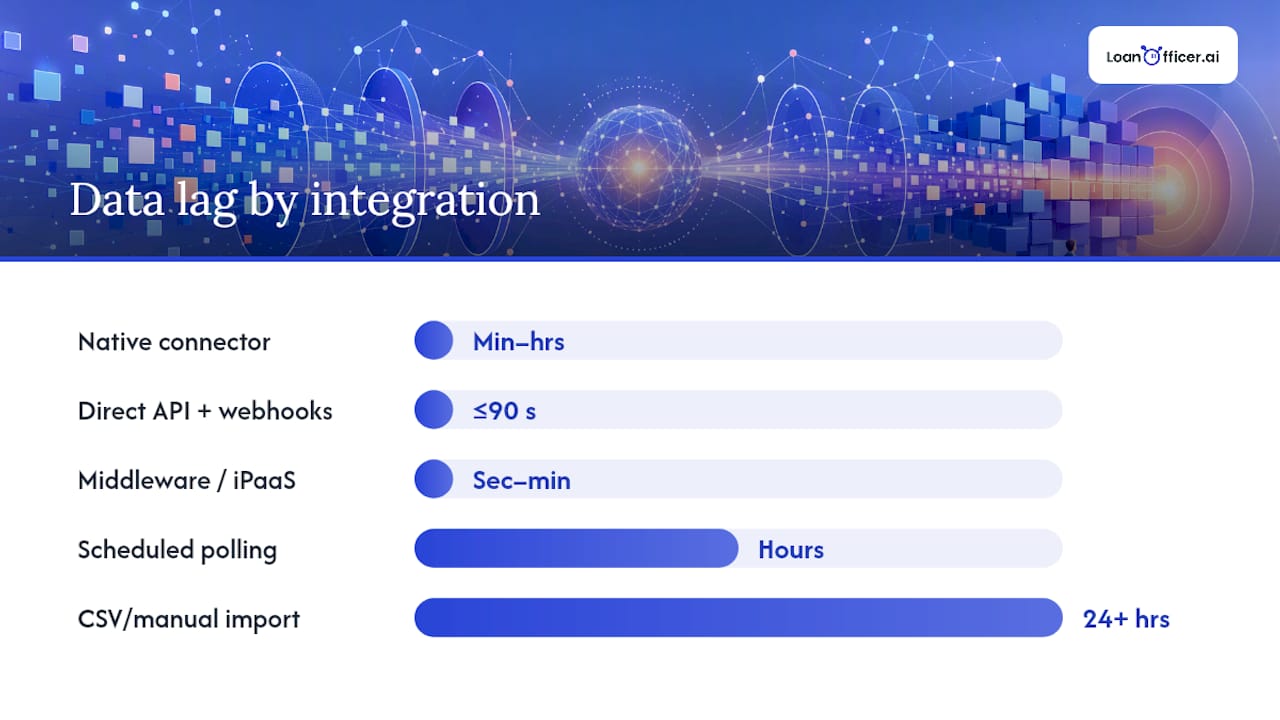
Your CRM subscribes to LOS webhook events (loan status changes, milestone updates, rate lock confirmations) and writes them back in near real time. Event-driven webhook syncs can reduce CRM data lag from 24–72 hours to under 90 seconds in practice. One brokerage scenario documented a reduction from roughly 62 hours of lag to under 90 seconds after wiring LOS webhooks directly to their CRM. This approach scales well and handles milestone-driven communications reliably. The cost: someone needs to monitor webhook delivery, handle retries, and manage API version changes when the LOS updates.
Middleware and iPaaS platforms
Tools like Zapier, Make, or dedicated mortgage middleware sit between the LOS and CRM, translating data formats and routing events. This is the right call for teams without internal engineering resources. Smaller brokerages with 5–40 loan officers can implement meaningful integrations using webhooks or middleware without a dedicated dev team. The middleware vendor handles retry logic and API updates, which lowers your maintenance burden significantly.
Scheduled API polling and CSV fallbacks
Polling pulls data on a schedule (hourly, nightly) rather than on events. It works, but it reintroduces the staleness problem you’re trying to solve. A nightly batch means a loan that funded at 3 PM won’t show as funded in your CRM until the next morning. CSV imports are a last resort for legacy LOS systems with no API — they require manual intervention and are error-prone. Use these only when no other option exists, and build a plan to migrate off them.
Pro Tip:When evaluating middleware vendors, ask specifically how they handle webhook delivery failures. A platform with automatic retry logic and a dead-letter queue for failed events is worth the extra cost over one that silently drops failed syncs.
| Approach | Best for | Data lag | Maintenance burden |
|---|---|---|---|
| Native connector | Popular LOS/CRM pairs | Minutes to hours | Low (vendor-managed) |
| Direct API + webhooks | Mid-market, enterprise | Under 90 seconds | Medium (internal monitoring) |
| Middleware/iPaaS | Small brokerages, no dev team | Seconds to minutes | Low to medium |
| Scheduled polling | Legacy LOS, limited API | Hours | Low |
| CSV/manual import | No-API legacy systems | 24+ hours | High |
How do you implement LOS–CRM integration in three steps?
Step 1: Map your business flow and prioritize fields
Start at the lead and end at funded. Walk every handoff: lead capture in CRM, application creation in LOS, processing milestones, underwriting, approval, rate lock, closing, and funding. At each stage, identify which data field changes and which system is authoritative for it.
The LOS is authoritative for financial and status fields: loan status, rate lock expiry, estimated close date, loan amount, and milestone dates. The CRM is authoritative for relationship data: contact notes, referral source, communication history, and follow-up tasks. This split prevents destructive last-write-wins conflicts where a CRM update overwrites a loan status the LOS just changed.
Your minimum viable sync set: loan status, rate lock expiry date, estimated close date, and borrower contact info. Get these four fields syncing bi-directionally before adding anything else.
Step 2: Connect systems and run a pilot
Configure your chosen architecture (webhooks, middleware, or native connector) and run it against five pilot loans before touching live production data. Monitor:
- Webhook delivery confirmation for each status change
- Field mapping accuracy (does “conditional approval” in Encompass map to the right stage in your CRM?)
- Sync latency (measure the actual time between an LOS event and the CRM update)
- Error queue — any failed events should surface in a dashboard, not disappear silently
After five loans, reconcile the CRM records against the LOS manually. Every discrepancy is a mapping or timing issue to fix before full rollout.
Step 3: Surface data and define KPIs
Once the sync is live, the data needs to be visible where LOs actually work. Configure deal stage views that reflect real LOS milestones, set up rate lock expiry alerts that fire 10 and 3 days before expiry, and build a funding event trigger that kicks off a post-close referral sequence automatically.
Track three KPIs in the first 90 days: data lag (time between LOS event and CRM update), percentage of pipeline records with a status older than 24 hours, and time-to-close compared to the pre-integration baseline.
What roadblocks will you hit, and how do you clear them?
Status write-back missing
The most common failure mode. A vendor demos prefill beautifully — borrower data flows from CRM to LOS at application creation — but never shows the reverse. Ask during every demo: “Show me a loan status change in the LOS appearing in the CRM right now.” If they need to schedule a separate call to demonstrate it, that’s your answer.
Validate write-back with a stopwatch during UAT. Change a loan status in the LOS sandbox and measure how long it takes to appear in the CRM. Anything over five minutes in a webhook-based system is a configuration problem.
Field mapping and integration debt
Point-to-point connectors without an admin-configurable layer accumulate integration debt as loan products and custom fields multiply. Every new product type, every new LOS custom field, requires an engineering change. Over two or three years, this becomes a significant maintenance cost.
The mitigation: choose a CRM with an admin mapping UI that lets a non-technical user remap fields without opening a support ticket. During vendor demos, add a custom field in the LOS and ask the vendor to remap it in the CRM while you watch. Count the steps. Fewer than five steps with no code is the target.
Staff adoption
An integration that works technically but gets ignored operationally is a failed integration. LOs who don’t trust the CRM data will keep checking the LOS directly, which defeats the purpose. Role-based dashboards that surface only the fields each person needs — LO sees their pipeline, processor sees doc status, manager sees team-wide metrics — reduce cognitive load and build trust faster than training alone.
Build a rollback plan before go-live. If the sync fails silently for 48 hours, what’s the detection mechanism? Who gets alerted? What’s the manual fallback? Document it and test it.
| Roadblock | Detection signal | Mitigation |
|---|---|---|
| No status write-back | CRM status unchanged after LOS milestone | Require live write-back demo; set webhook monitoring |
| Field mapping debt | New product launch breaks sync | Choose admin-configurable mapping UI |
| Staff not using CRM | LOs checking LOS directly | Role-based dashboards; trust-building via accuracy |
| Silent sync failures | Stale records with no error alert | Error queue dashboard; daily reconciliation report |
Which CRM features do mortgage loan officers actually need?
1. Bi-directional sync with event-driven webhooks
This is the non-negotiable. A CRM that only receives data at application creation is a one-time import. You need real-time status write-back from the LOS, triggered by events, not schedules. Without it, every pipeline review is a guess.
2. Admin-configurable field mapping
When you launch a new loan product or your LOS vendor adds a field, you need to remap without filing a support ticket or waiting for a developer. An admin UI that lets your ops manager handle field mapping keeps the integration current without engineering overhead.
3. Workflow automation tied to LOS milestones
Rate lock reminders, doc chase sequences, conditional approval notifications, and post-close referral requests should all fire automatically when the LOS hits the corresponding milestone. This is where the LOS integration pays for itself in borrower communication — the LO doesn’t have to remember to send the update because the system already did it.
4. Compliance audit trail and role-based access
Mortgage data includes PII, income documentation, and credit information. Every field access and data change should be logged with a timestamp and user ID. Role-based access controls ensure processors can’t see fields they don’t need, and managers can audit activity without exposing borrower data unnecessarily.
Pro Tip:Ask your CRM vendor for a sample audit log export before signing. If they can’t produce one in under five minutes, their compliance logging is probably not production-ready.
5. Mobile pipeline visibility
Loan officers close deals outside the office. A mobile view that shows current loan status, rate lock expiry, and next required action — pulled live from the LOS — means an LO can answer a borrower’s question accurately from a coffee shop without calling the processor. Real-time pipeline management on mobile is a practical daily-use feature, not a nice-to-have.
What does a realistic implementation checklist look like?
Before go-live
- Complete a data audit: export all active pipeline records and identify field inconsistencies between LOS and CRM
- Build a canonical field list: agree on which system is authoritative for each field
- Request sandbox access from both vendors
- Assign a project owner (not just an IT contact) who understands the loan workflow
- Define success metrics: target data lag, percentage of records with current status, time-to-close baseline
During rollout
- Map fields using the admin UI; document every mapping decision
- Configure sync rules: which events trigger a write-back, which fields are read-only in the CRM
- Run five to ten pilot loans through the full lifecycle in sandbox
- Monitor webhook delivery logs and error queues daily during pilot
- Conduct UAT with at least two LOs and one processor; reconcile CRM records against LOS manually
- Confirm rollback procedure: how to disable the sync and revert to manual entry if needed
After go-live
- Set up a daily reconciliation report: records where LOS status and CRM status differ by more than four hours
- Configure alerting for webhook delivery failures (email or Slack notification within 15 minutes of a failed event)
- Run a 30-day training session for new LOs covering how to read the integrated pipeline view
- Schedule a 90-day review: pull KPIs and compare against baseline
Pro Tip:Run your pilot loans in a sandbox environment that mirrors production data formats exactly. A pilot that uses simplified test data will miss field-mapping errors that only appear with real loan structures.
| Phase | Key tasks | Owner |
|---|---|---|
| Pre-work | Data audit, canonical field list, sandbox access | Ops manager |
| Mapping | Field mapping, sync rule configuration | CRM admin |
| Pilot | 5–10 loans, webhook monitoring, UAT | LO + processor |
| Go-live | Production cutover, error queue monitoring | Project owner |
| Post-go-live | Reconciliation reports, alerting, 90-day review | Ops manager |
How does Loan Officer AI integrate with LOS, and what results can you expect?
Loan Officer AI is built specifically for mortgage professionals, with LOS integrations designed around the event-driven architecture described in this guide. The platform uses API-prefill for application creation and webhook-based status write-back for milestone updates, which means loan status changes in the LOS surface in the CRM pipeline view in near real time rather than on a nightly batch.
The practical workflow: when a loan hits conditional approval in the LOS, Loan Officer AI triggers a borrower notification automatically, logs the milestone in the deal timeline, and queues a doc chase task for the processor. The LO sees the updated status on their mobile dashboard without logging into the LOS. When the loan funds, a post-close referral sequence fires without manual intervention.

The time savings come from eliminating the manual status checks and duplicate entry that consume 30–60 minutes per day for a typical loan officer managing an active pipeline.
Six questions to ask during any LOS integration demo
- Show me a live status change in the LOS appearing in the CRM. How long does it take?
- What happens when a webhook delivery fails? Where does the error surface?
- If I add a custom field in the LOS today, how many steps does it take to remap it in the CRM?
- Which system is authoritative for financial fields, and how are write conflicts resolved?
- What’s the SLA for API updates when the LOS vendor releases a new version?
- Can you show me the audit log for a specific field change, including timestamp and user ID?
| Demo question | What a good answer looks like |
|---|---|
| Live write-back speed | Under 90 seconds, demonstrated live |
| Webhook failure handling | Error queue with automatic retry and alert |
| Custom field remapping | Fewer than 5 steps, no code required |
| Conflict resolution | LOS authoritative for status; CRM for notes |
| API update SLA | Vendor-managed with documented timeline |
| Audit log access | Exportable, timestamped, user-attributed |
How do you protect mortgage data during integration?
Mortgage data is among the most sensitive PII a business handles: Social Security numbers, income documentation, credit scores, and property addresses all move across the LOS–CRM connection. Every integration architecture needs to address this at the transport, storage, and access layers.
At the transport layer, all data in transit between LOS and CRM must use TLS 1.2 or higher. Webhook payloads should never include full SSNs or credit data in the event body — use a loan ID as the key and pull sensitive fields only when needed via an authenticated API call. This limits exposure if a webhook endpoint is ever misconfigured.
At the storage layer, confirm that your CRM vendor encrypts data at rest and that their data centers are SOC 2 Type II certified. For mortgage-specific compliance, verify that the CRM’s data retention and deletion policies align with your obligations under the Gramm-Leach-Bliley Act (GLBA) and any applicable state privacy laws.
Role-based access controls are the operational layer. Processors should not see income documentation fields they don’t need. Junior LOs should not have access to the full borrower credit profile. Every access event should be logged. Run a quarterly access audit to confirm that role assignments still match actual job functions — people change roles, and permissions rarely get updated automatically.
How do you keep data consistent after the integration goes live?
The integration going live is not the end of the project. Data consistency degrades over time if you don’t actively maintain it. Three practices keep it clean.
First, run a scheduled reconciliation report. Every morning, a script or report should compare LOS loan status against CRM deal stage for every active loan. Any record where the two systems disagree by more than four hours gets flagged for manual review. This catches silent sync failures before they affect pipeline decisions.
Second, treat field mapping as a living document. Every time your LOS vendor releases an update or you launch a new loan product, review the canonical field list and confirm that mappings still hold. Assign this task to a named person — not “the team” — with a calendar reminder tied to your LOS vendor’s release schedule.
Third, establish a data steward role. This doesn’t need to be a full-time position. It’s one person (usually an ops manager or senior processor) who owns the integration health, reviews the reconciliation report weekly, and escalates issues before they compound. Without a named owner, integration maintenance falls through the cracks within six months of go-live.
How do you monitor and maintain the LOS–CRM connection over time?
Monitoring is what separates a durable integration from one that quietly degrades. Set up three layers of visibility.
Webhook delivery monitoring is the most time-sensitive. Your middleware or CRM should expose a dashboard showing webhook events received, processed, and failed in the last 24 hours. A spike in failures usually means the LOS vendor pushed an API change without notice.
Latency tracking catches performance degradation before it becomes a user complaint. Log the timestamp of each LOS event and the timestamp of the corresponding CRM update. If average latency climbs from 45 seconds to 8 minutes over two weeks, something changed — a new field in the payload, a rate limit being hit, or a middleware bottleneck.
Quarterly integration reviews should cover three things: current KPIs versus the 90-day baseline, any field mapping changes made since the last review, and upcoming LOS or CRM vendor releases that might affect the connection. Thirty minutes per quarter prevents the kind of slow drift that turns a working integration into a broken one over 18 months.
What the right LOS–CRM integration approach looks like for loan officers
Integrating your LOS and CRM with event-driven webhooks and API-prefill gives mortgage teams the fastest, most reliable path to accurate pipeline data and automated borrower communication.
| Point | Details |
|---|---|
| Architecture choice | Event-driven webhooks plus API-prefill is the lowest-risk path for real-time status accuracy. |
| Minimum viable sync set | Prioritize loan status, rate lock expiry, estimated close date, and borrower contact before adding more fields. |
| Pilot before production | Run 5–10 loans through a sandbox and reconcile manually before cutting over to live data. |
| 90-day KPIs to watch | Track data lag, percentage of stale pipeline records, and time-to-close versus your pre-integration baseline. |
| Loan Officer AI | Offers LOS integration with event-driven write-back and AI-automated follow-ups. |
What most integration guides get wrong about LOS–CRM connections
The standard advice on LOS–CRM integration focuses almost entirely on the setup: pick a connector, map your fields, go live. What it consistently underweights is the operational reality six months later.
Most integrations that fail don’t fail at launch. They fail slowly. A LOS vendor pushes an API update, a webhook endpoint stops receiving events, and nobody notices for two weeks because the CRM still shows data — just data that’s two weeks old. By the time someone catches it, the pipeline report has been wrong for a dozen deals.
The second thing guides miss: field mapping is not a one-time task. Every new loan product, every LOS configuration change, every CRM workflow addition touches the mapping layer. Teams that treat the integration as “done” after go-live accumulate debt quietly until a product launch breaks the sync entirely.
The third gap is the write-back assumption. Loan officers often assume that because their CRM vendor says “LOS integration,” the connection is bidirectional. It frequently isn’t. Prefill from CRM to LOS at application creation is easy to build and easy to demo. Status write-back from LOS to CRM requires event-driven architecture, webhook subscriptions, and conflict resolution logic. Ask for the write-back demo specifically. If the vendor pivots to showing you prefill instead, you have your answer.
The practical priority order: get write-back working first, get it working in real time second, and then add automation on top of accurate data. Automation built on stale data doesn’t save time — it sends the wrong message at the wrong moment, which is worse than no automation at all.
Loan Officer AI gives you the integration your pipeline actually needs
Most mortgage CRMs bolt on an LOS connection as an afterthought. Loan Officer AI built LOS integration into the core of the platform from the start, which means the event-driven write-back, automated borrower sequences, and real-time pipeline visibility described in this guide are live features, not roadmap promises.
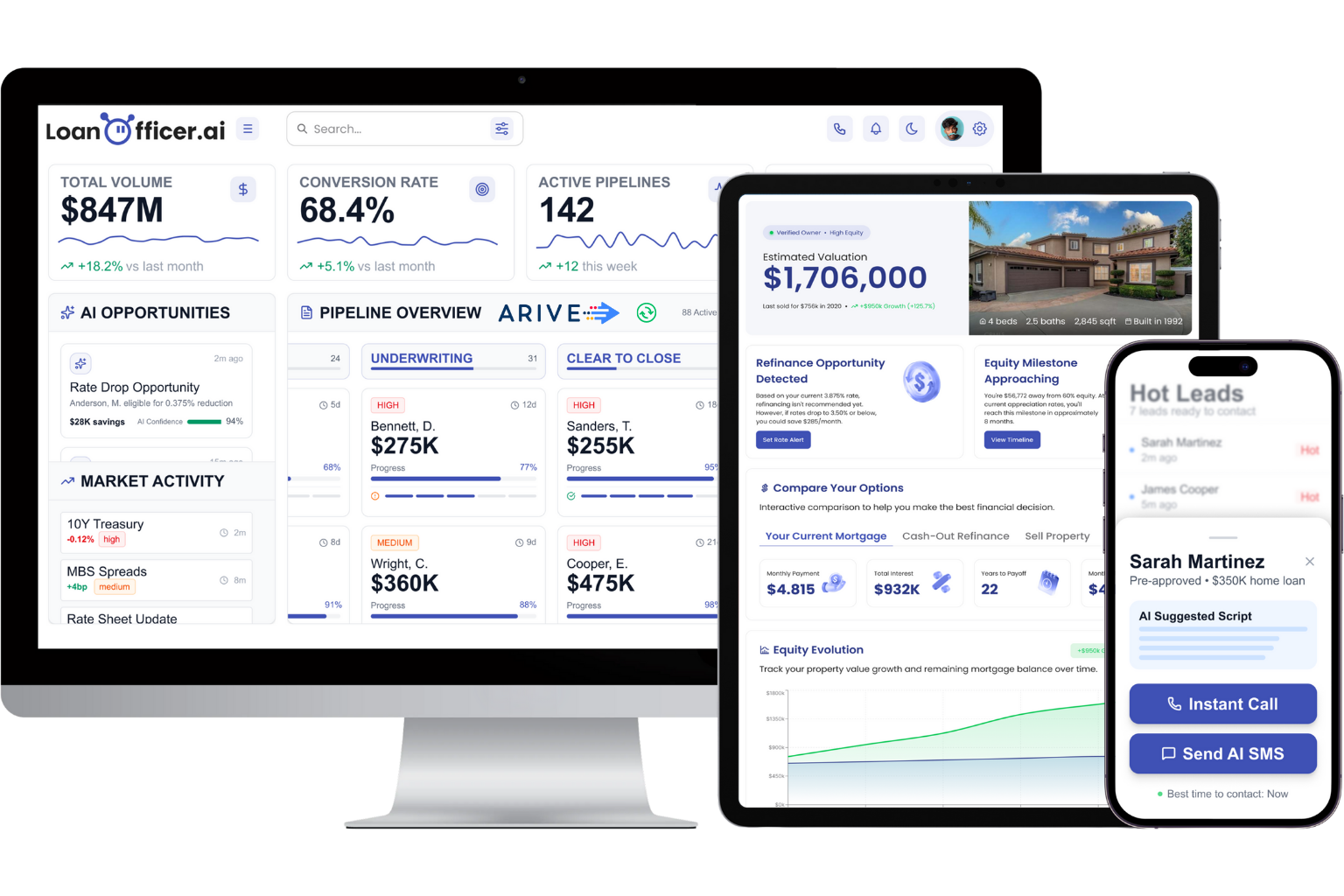
For loan officers managing an active pipeline, the difference shows up immediately: status changes in the LOS trigger borrower communications automatically, rate lock expiry alerts fire without manual calendar entries, and the mobile dashboard reflects what’s actually happening in the loan file right now. For brokerages scaling a team, role-based dashboards and team pipeline views give managers accurate visibility without requiring every LO to manually update a spreadsheet.
Start a trial and connect your LOS in the first session: try Loan Officer AI free.
Sources
- CRM and LOS Integration for Lenders: Why the Gap Between Systems Costs More Than You Think
- Optimizing Mortgage Operations with LOS and CRM Integration
- Mortgage Software: CRM to LOS Automation Guide
