30/60/90 Mortgage CRM Onboarding for Loan Officers
The fastest path to a working mortgage CRM is a phased rollout led by one owner, with a small number of prioritized pipelines, essential loan origination software integrations, role-based training, and a 30/60/90 KPI plan. A quick pilot takes 2 to 6 weeks; full rollout across a team usually runs 4 to 12 weeks depending on data quality and integration complexity. Appoint your owner today and start with the checklist below.
TL;DR:
- Implementing a mortgage CRM typically takes 2 to 8 weeks depending on team size, data complexity, and integration scope, with longer timelines for enterprise setups.
- Assigning a dedicated owner, focusing on essential pipelines, and building initial automations around lead response and appointment booking are key to a successful rollout.
- Prioritize data cleanup, LOS integration, and role-based training to prevent early failures caused by dirty data and insufficient user engagement.
- Early KPIs, such as response time and automation completion rate, should be tracked weekly in the first 90 days to measure real business impact.
- Lack of ownership and over-automation before mastering basic workflows are the most common reasons CRM implementations fail or are abandoned.
Table of Contents
- Mortgage CRM Onboarding Checklist for the First 30 to 90 Days
- Who Owns CRM Implementation, and How Long Does It Take?
- How Should You Structure Pipelines and Automations?
- What’s the Right Way to Migrate Data and Connect Your LOS?
- How Do You Train Each Role Without Losing Momentum?
- Which KPIs Prove Your CRM Onboarding Actually Worked?
- Why Do Mortgage CRMs Get Abandoned?
- The Priority Order Nobody Follows (And Should)
- Get Mortgage CRM Onboarding Right the First Time
- Sources
Mortgage CRM Onboarding Checklist for the First 30 to 90 Days
Every successful onboarding starts the same way: someone gets named the owner, and everyone else finds out who to bug when something breaks. Skip that step and you get five loan officers running five different versions of “the CRM,” which is really just a shared inbox with extra buttons.
Here’s the order that actually works, based on how mortgage teams move from purchase decision to daily use without losing momentum:
- Assign an owner and confirm stakeholders. One person, usually a producing branch manager or a designated CRM administrator, owns the timeline and the vendor relationship. Executive sponsors and IT support get named at the same time.
- Decide pilot or full rollout. A solo loan officer or a two-person team can often skip the pilot phase. A brokerage with 10+ users should not.
- Define 3 to 5 core goals. Faster lead response, more refinance capture, better realtor follow-up, whatever matters most this quarter. Building automations before you know the goal is how teams end up with a CRM full of unused features.
- Map your essential pipelines and stage definitions. Start with Leads and Loans in Process; add more only once those run cleanly.
- Identify priority integrations and the data that needs migrating. Your loan origination system (LOS) sync and your existing contact database usually top the list.
- Build the minimal automation set that drives revenue first. Instant lead response, appointment booking, and document reminders cover most of the early value.
- Schedule role-based training and a pilot feedback loop. Not everyone needs the same training, and nobody remembers a two-hour session from week one.
- Set 30/60/90 KPIs and a reporting cadence. Response time, pipeline velocity, and automation completion rates give you an early read on whether onboarding is working.
Housing industry guidance backs this exact sequence: define your goals and pipeline mapping before you touch automation settings, not after.
Pro Tip:Resist the urge to import every contact you’ve ever emailed on day one. Migrate your active pipeline first, then backfill your older database once the team trusts the system enough to use it daily.
Who Owns CRM Implementation, and How Long Does It Take?
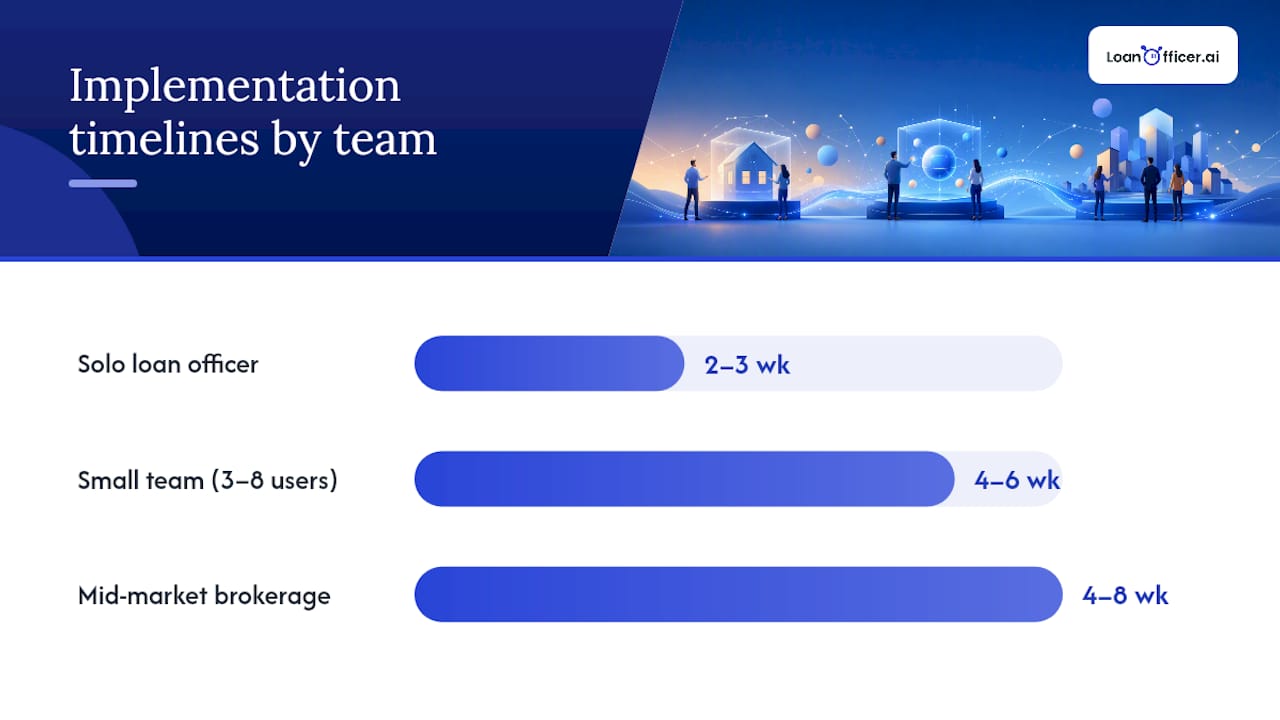
Timeline expectations depend heavily on team size, and vendors routinely underestimate both. A solo loan officer with a clean contact list can be fully operational in 2 to 3 weeks. A small team of 3 to 8 users usually needs 4 to 6 weeks to get pipelines, integrations, and training aligned. A mid-market brokerage with multiple branches and a legacy LOS often lands in the 4 to 8 week range for a proper implementation, sometimes longer if data cleanup drags.
Vida’s implementation research puts the wider range at two weeks for simple deployments up to 3 to 6 months for enterprise-scale rollouts, and recommends budgeting 20 to 30% more time than whatever the vendor quotes. That padding isn’t pessimism. It’s just what happens when real data meets a new system.
Clear ownership prevents most delays:
- CRM owner: runs the day-to-day rollout, owns the vendor relationship, and makes stage-definition calls.
- Executive sponsor: clears budget and holds the team accountable to adoption targets.
- IT or admin support: handles LOS connections, security permissions, and data exports.
- Vendor onboarding specialist: guides configuration and troubleshoots integration issues.
- Power users: three to five early adopters who test workflows before the full team touches them.
A well-scoped pilot uses those a small group of power users, a fixed set of success metrics, and a short test window of a few days to a week, focused on the automations that matter most: lead response and appointment booking. If those two hold up under real volume, you have a green light. If lead routing breaks or bookings double, that’s your go/no-go signal to fix before scaling.
Budget for more than the subscription fee. Professional onboarding services, internal staff hours during setup, and a contingency for unexpected data cleanup all belong in the plan, particularly for brokerages moving off a legacy system with years of inconsistent contact records.
How Should You Structure Pipelines and Automations?
Most mortgage teams overbuild their CRM before they’ve proven the basics work. The fix is starting with fewer pipelines than feels comfortable, then earning the right to add more.
Which pipelines do you actually need?
Two pipelines cover most loan officers at the start:
- Leads pipeline: tracks prospects from first contact through application.
- Loans in Process pipeline: tracks funded applications from submission through closing.
Teams that manage realtor partnerships or refinance campaigns separately often add a third pipeline once the first two are running cleanly. Resist creating a fourth or fifth pipeline in week one. It’s easier to split a pipeline later than to merge two half-built ones.
What does a stage breakdown look like?
A typical Leads pipeline runs through five or six stages: New Lead, Contacted, Qualified, Application Started, Application Submitted, and Lost or Nurture. A Loans in Process pipeline usually mirrors your LOS milestones: Submitted, Processing, Underwriting, Conditional Approval, Clear to Close, Funded. Keep each pipeline under eight stages. More than that and reps start skipping steps or logging everything at the last stage just to move on, which quietly destroys your reporting.
Which automations should come first?
Build in this order, and don’t skip ahead:
- Instant lead response: an automated first-touch message the moment a lead enters the system, before a human ever sees it.
- Calendar booking: removes the back-and-forth of scheduling a call.
- LOS status-triggered messages: automatically update borrowers when their loan moves through underwriting milestones.
- Document reminders: chase down missing paperwork without a manual phone call.
HousingWire’s setup guidance is direct about sequencing: map your pipeline stages before building automations, since automations built around undefined stages tend to break the first time a lead moves unexpectedly. Once those four automations run reliably for two to three weeks and you can see their effect on response time or booking rates, expand carefully. Add realtor-partner nurture sequences, refinance opportunity alerts, or database-mining campaigns for HELOC candidates one at a time, measuring each before adding the next.
Pro Tip:If you can’t explain why a new automation exists in one sentence, don’t build it yet. “Because the CRM can do it” is not a reason.
What’s the Right Way to Migrate Data and Connect Your LOS?
Data migration is where most onboarding timelines quietly blow past their estimate. It’s rarely the CRM software that causes delays. It’s the eleven-year-old spreadsheet with three different formats for phone numbers.
Four integrations matter more than the rest for a working mortgage workflow:
- Loan origination system (LOS): syncs loan status so your CRM reflects real pipeline stages, not stale manual updates.
- Pricing engine: feeds current rate data into borrower communications and refinance alerts.
- Contact and lead sources: pulls in leads from your website, realtor referrals, and any paid lead vendors.
- Email and calendar: keeps communication history and scheduling inside one system instead of scattered across inboxes.
Before you migrate anything, audit what you’re bringing over. Duplicate contacts, dead email addresses, and inconsistent field formats (some phone numbers with dashes, some without, some with extensions jammed into the name field) create chaos downstream if they cross over unchecked.
A workable pre-migration sequence looks like this:
- Export and dedupe your existing contact database before touching the new system.
- Standardize field formats (dates, phone numbers, loan status labels) so mapping doesn’t break.
- Map fields deliberately, not just automatically, since LOS status names rarely match CRM stage names one for one.
- Run a test migration with a small batch, then reconcile record counts and spot-check ten to twenty records manually.
- Keep your old system live in read-only mode for at least 30 days as a rollback option.
Sonar’s implementation research recommends staged migrations over one-shot data dumps, noting that mid-market mortgage teams typically need 4 to 8 weeks to get integrations and data fully reconciled, largely because of exactly this kind of cleanup work.
Vendor pricing and setup costs vary by scope. Small-team CRM software often runs $50 to $150 per user monthly, with implementation fees ranging from roughly $2,000 for straightforward setups to $25,000 for complex, multi-system deployments.
Compliance deserves a specific mention here, not a footnote. Borrower financial data falls under the Gramm-Leach-Bliley Act and Fair Credit Reporting Act, which means encrypted storage, access controls limited to authorized staff, and audit trails on who touched what data and when. Confirm your CRM vendor’s security certifications before migration, not after you’ve already loaded five years of borrower records into a new system.
How Do You Train Each Role Without Losing Momentum?
Training fails for a predictable reason: everyone gets the same 90-minute overview, and three weeks later half the team has quietly gone back to their old spreadsheet. Role-specific training, spaced out over time, works better than one long session for everybody.
A realistic training arc runs on four checkpoints:
- Day 1: system access and core navigation. Every role learns login, dashboard basics, and where their assigned leads live. Keep this under 45 minutes.
- Week 1: role-specific workflows. Loan officers focus on lead response and pipeline movement. Processors focus on document tracking and status updates. Admins focus on reporting and data hygiene.
- Week 4: automation fluency and troubleshooting. By now users have hit real friction points. This is the session where you fix what’s actually broken, not what you guessed might break.
- Week 12: performance review and refinement. Compare actual usage against goals set in week one, and adjust workflows that aren’t earning their keep.
That 60 to 90 day arc lines up with broader industry data on loan officer onboarding, which links structured milestones at week 1, week 4, and week 12 to lower first-year attrition and faster ramp-up.
Process templates built specifically for loan originator onboarding recommend pairing new users with a shadowing period and a supervised first assignment before turning them loose solo. That structure translates directly to CRM adoption: pair new users with a power user for their first week of live pipeline work rather than sending them a help article and hoping.
Between formal sessions, reinforce habits with small nudges rather than more meetings:
- In-CRM prompts that flag an overdue follow-up before it becomes a missed lead.
- One-page role checklists posted somewhere visible, not buried in a shared drive nobody opens.
- Weekly office hours with your power users or CRM owner, 30 minutes, optional attendance, real questions only.
Loan officers new to a CRM environment often benefit from dedicated onboarding resources built around their specific starting point rather than a generic walkthrough. Collect feedback at each checkpoint, not just at the end. A quick two-question survey after week 1 and week 4 (What’s working? What are you avoiding?) surfaces friction before it turns into abandonment.
Pro Tip:Track who stops logging activity after week two. That’s your earliest warning sign of adoption failure, weeks before it shows up in your revenue numbers.
Which KPIs Prove Your CRM Onboarding Actually Worked?
Onboarding isn’t done when training ends. It’s done when the numbers move. Four metrics tell you whether the rollout produced real business value or just busywork.
- Lead response time: how fast a new lead gets a first touch, automated or human.
- Lead to application conversion rate: the percentage of leads that become active applications.
- Time to close: average days from application to funded loan.
- Automation completion rate: the percentage of automated sequences that run without manual intervention or error.
Set a baseline before the CRM goes live, even if it’s rough. Pull your last quarter’s average response time from memory or old call logs if you have to. Then set 30/60/90 day targets against that baseline rather than against an arbitrary industry benchmark that doesn’t reflect your actual starting point.
| Checkpoint | Focus | Target Signal |
|---|---|---|
| Day 30 | Adoption and data quality | Most leads logged in CRM within 24 hours |
| Day 60 | Automation reliability | Automated sequences running with under 5% manual override |
| Day 90 | Business impact | Measurable lift in response time and conversion vs. baseline |
Weekly dashboards work better than monthly ones during the first 90 days, since you want to catch a broken automation or a stalled pipeline within days, not after a full reporting cycle has already passed. Once you’re past the 90-day mark, connect pipeline activity directly to funded loan volume. If your instant lead response automation correlates with a measurable jump in applications submitted within 24 hours, that’s your ROI case, and it’s the number that justifies the CRM cost to anyone above you who’s asking.
Why Do Mortgage CRMs Get Abandoned?
Most CRM failures aren’t software failures. They’re planning failures that show up six weeks in, right when the initial excitement fades and old habits start creeping back.
The most common failure modes, in order of how often they actually kill a rollout:
- No dedicated owner. When everyone is “sort of” responsible, nobody actually is, and small problems pile up unaddressed.
- Over-automation before the basics work. Teams build fifteen automated sequences before confirming the first three don’t misfire.
- Dirty migrated data. Duplicate records and broken field mappings erode trust in the system within the first week.
- Insufficient role-based training. A one-size-fits-all session leaves processors and loan officers both undertrained on what they specifically need.
- No adoption measurement. Without a pilot feedback loop, small frustrations go unheard until they’ve already caused people to quit using the tool.
Research on mortgage CRM strategy failures identifies ownership gaps and weak adoption planning as two of the most common cracks that quietly sink ROI, often well before leadership notices anything’s wrong.
Watch for early warning signs during your pilot: power users going quiet in feedback sessions, leads sitting untouched in a pipeline stage for days, or team members asking to “just email like before.” Any of those during week 2 or 3 means something in the setup needs fixing now, not after full rollout.
If a rollout is already struggling, a short triage sequence can often save it: reconfirm the owner, cut automations back to the two or three that matter most, re-audit the migrated data for the specific records causing complaints, and run one additional targeted training session for the role reporting the most friction. Fixing the actual bottleneck beats restarting from scratch almost every time.
The Priority Order Nobody Follows (And Should)
Most mortgage teams treat CRM onboarding like a software rollout. It’s not. It’s a behavior change project with software attached, and that distinction changes what you should actually prioritize first.
The playbook that produces the fastest lift, in this order: assign a real owner before you configure anything, build two pipelines instead of five, get instant lead response working before touching a single nurture campaign, and measure adoption weekly for the first month instead of waiting for a quarterly review. Every other decision, which integrations to prioritize, how granular your stages get, whether you run a formal pilot, matters less than getting those four right.
The gap most guides miss is this: teams don’t abandon CRMs because the software is bad. They abandon them because nobody made the first 30 days feel like a win. If lead response time visibly drops in week one, adoption takes care of itself. If the team spends week one arguing about stage names and field mappings, you’ve already lost momentum you won’t easily get back.
Ownership matters more than any feature comparison ever will. A brokerage with a mediocre CRM and a dedicated owner who checks adoption weekly will consistently outperform a brokerage with premium software and no one steering it. That’s not a knock on any particular platform. It’s just what fifteen years of watching software rollouts, mortgage or otherwise, tends to prove.
— Jared Hart
Get Mortgage CRM Onboarding Right the First Time
Some mortgage CRM platforms offer mortgage-specific pipeline templates structured for Leads and Loans in Process, direct LOS syncs to reduce manual status updates, and instant automated lead responses running from day one rather than week six.
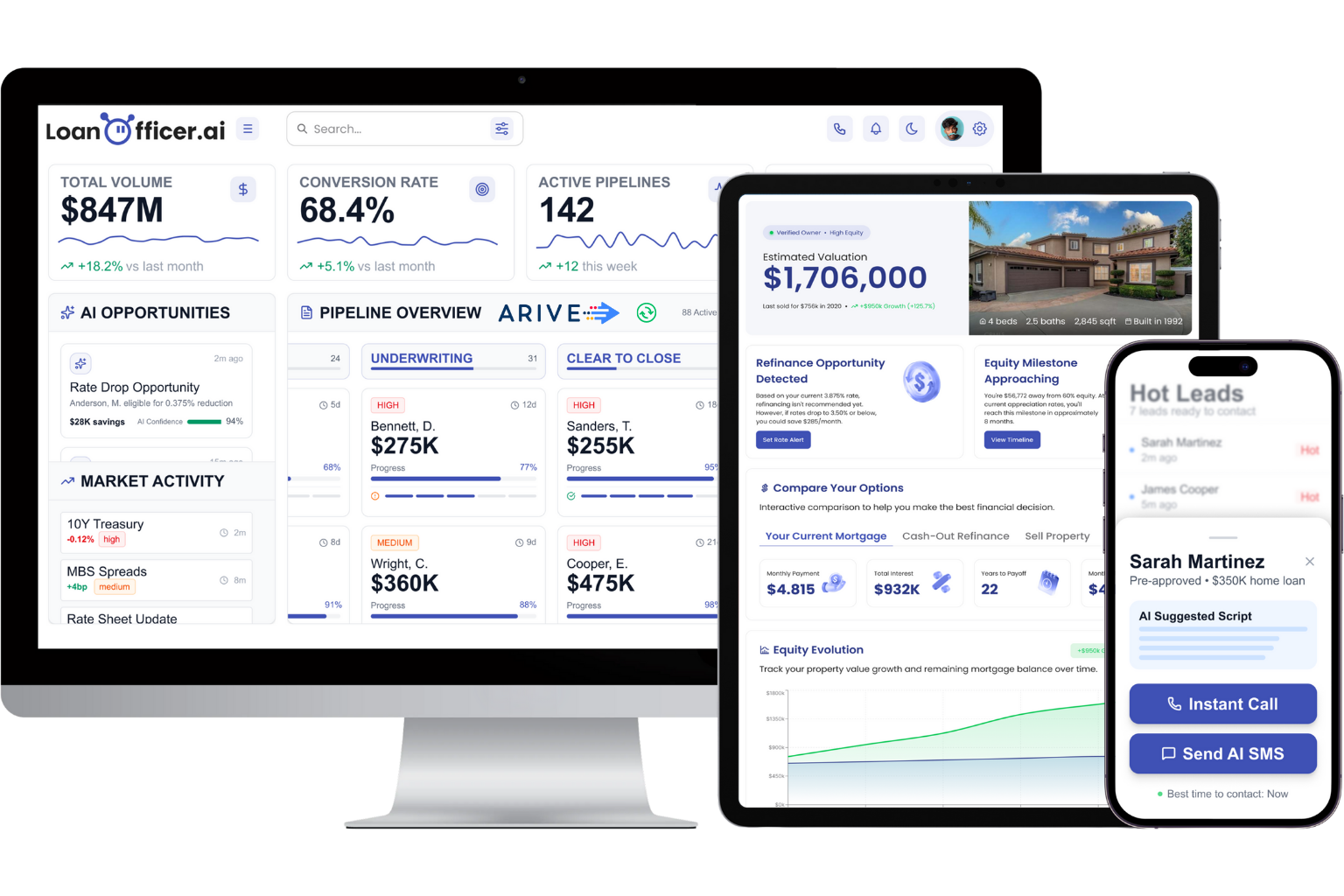
Onboarding options scale with how much hands-on setup you want. A self-serve trial lets you explore pipelines and automations on your own pace, while professional onboarding services pair you with a specialist who handles data migration, role-based training, and integration setup, the exact work this article just walked through. Most independent loan officers see working automations within days rather than weeks, since the platform’s opportunity detection and follow-up sequences come pre-built for mortgage workflows instead of needing to be assembled from a generic CRM toolkit. Start your setup at the mortgage CRM landing page and see how fast your pipeline actually gets moving.
Sources
For readers who want to go deeper on any single piece of this playbook, these sources cover the ground in more detail:
- Where should you start when setting up your CRM? — HousingWire
- Mortgage Loan Officer Onboarding | Process Street
- Best practices for effective mortgage CRM implementation — Sonar
- Mortgage CRM strategy: The 7 cracks killing your ROI — Lauren Dobie
- Mortgage Broker CRM: Complete Guide to Systems & Selection — Vida
